Showing posts with label Softwares. Show all posts

Wednesday, November 16, 2011

How to crack IDM manually?

Before we can proceed, let me tell you All the credit goes to the guys of www.isoftdl.com
This Post is for the Sophisticated Downloaders and it will help you if your IDM has run out of 30 days period or you have Inserted some Invalid Key and your Key has been Blacklisted.

Lets Get Started.
  • Open IDM and Click On Registration Tab on the Menu Bar and select Registration.
  • The Registration Dialog Box will appear. Fill out the general Info, You can give your actual or factual details, its your choice.


    Now Fill out the Serial Number Box with any of the Keys mentioned below.

    RLDGN-OV9WU-5W589-6VZH1
    HUDWE-UO689-6D27B-YM28M
    UK3DV-E0MNW-MLQYX-GENA1
    398ND-QNAGY-CMMZU-ZPI39
    GZLJY-X50S3-0S20D-NFRF9
    W3J5U-8U66N-D0B9M-54SLM
    EC0Q6-QN7UH-5S3JB-YZMEK
    UVQW0-X54FE-QW35Q-SNZF5
    FJJTJ-J0FLF-QCVBK-A287M


    Click On OK.
  • As expected this Dialog Box will appear.


    Don't get panic, this is exactly what we want.
  • Half of our work is done. Now proceed to C:\Windows\System32\drivers\etc directory. Right Click On hosts file and select Take Ownership if you are using Windows 7 and if you are using XP or vista, then no problem.
  • Open the hosts file in Notepad and Paste these following lines:

    127.0.0.1 tonec.com
    127.0.0.1 www.tonec.com
    127.0.0.1 registeridm.com
    127.0.0.1 www.registeridm.com
    127.0.0.1 secure.registeridm.com
    127.0.0.1 internetdownloadmanager.com
    127.0.0.1 www.internetdownloadmanager.com
    127.0.0.1 secure.internetdownloadmanager.com
    127.0.0.1 mirror.internetdownloadmanager.com
    127.0.0.1 mirror2.internetdownloadmanager.com


    It will look like this:
  • Save the hosts file and Open your IDM, Tada!! A fully functional IDM.
If problem still persists, then reboot the computer(It is not necessary though).

Happy Downloading *__*

Saturday, November 12, 2011

Play the g00d old Dos Games in Windows 7.

The New Tech. has certainly changed the whole gaming experience compared to what we used to have in the 90's. The modern day games are more than just games, they are just like the other things such as sleeping,eating and now gaming. But we can't forget the good old days when we used to fight with our friends, siblings, parents just to play once more. Prince,dave,skyroads,,man those were awesome.

Well Windows 7 doesn't support the DOS games and literally we can't play, as the full screen mode is not supported. But we can play the DOS games by using a 3rd party Software.
Let's play.
Download this software: DOSBOX. It is an x86 emulator.
Now Download your favorite DOS games from the link below.
www.dosgamesarchive.com

In this context I will show you How to play Prince? (Coz its my favorite. :D)

  • Create a New Folder in C: say it as OldGames.
  • Extract the .zip DOS game files to the folder OldGames.
  • Run DOSBOX.
  • Type MOUNT C C:\OldGames
  • Type C: and then go to the folder.
  • Start the Game by typing prince.exe or whatever the file is.
Press ALT+ENTER to toggle Full Screen.

Take a look at the screenshots below:


Happy GAMING. *_*

Wednesday, November 9, 2011

Installing Various Operating System and Kits in Pen-Drive.

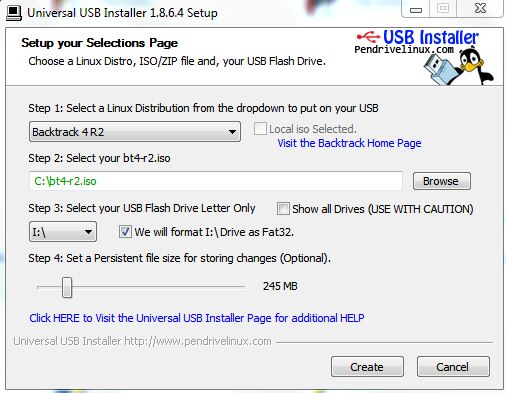
Don't think any thing, Just go the link below and download the Universal USB Installer Software.

Universal USB Installer

Note: Do check this Link from time to time because it gets updated as soon as any new Operating System or Kits are launched.

Now as half the work is done, its time to get ready with your respective ISO and Pen-Drive.
Just follow the On-screen Instructions and you will do just fine. But be careful while selecting the Pen-Drive.

In this context I will show How to install Backtrack 4r2 in USB. Its OK, ya go on laughing I don't have the latest version of Backtrack, I will download later.

Remember that the name of the .iso file should be exact as it is shown, if not then change the name to same else it will not detect the .iso file.


Now just Boot your System via Pen-Drive.

Turn your dumb Scroll Lock to a Network Indicator.

As we know most of the keyboard Num Lock and Scroll Lock are used once in a blue moon, so why not use the LED's of num and scroll lock as Network Indicators as Incoming and Outgoing Packets.
There is a cool Tool called Network-Lights. Download from the link below:

Network-Lights
Just extract and run the utility and it will adjust itself in the System Tray.


If you want to change the Settings then you can all do it in Settings.


I will certainly not recommend this to the laptop users as the Num lock is mostly embedded with the letters, so it becomes difficult to type but you can give it a try once.

Sunday, October 16, 2011

Experience 3D view of your desktop.

Tired viewing the same lifeless desktop over and over.Well then download this beautiful software.
BUMPTOP: It enhances your desktop with some pretty cool 3D views and the most interesting part is that it obeys basic physics laws. So enough explaining just go ahead and download from the link below.
Explore yourself.
Download BumpTop.
wait for sometime download will begin automatically.

Take a look at my desktop screenshot.


Tech. Arcade Copyright © 2011